
Your automated Windows web server engineer
Drop & Click Production Grade Web Hosting Server Setup
ServerMaid is not another control panel. Copy it to any Windows VPS or dedicated server, click once, and it does the work of a Windows server engineer: it builds and hardens a production-grade IIS, PHP and MySQL web server, proves it works, then keeps watching it and puts it right when something drifts. Free SSL certificates* trusted by every browser and renewed automatically. No coding. No PowerShell. No sysadmin on the payroll.
From £99 £49.50 per server for twelve months. Your account is ready within minutes, with the ServerMaid installer and your licence ready to download. 30-day money-back promise.
- One file on the desktop, one click to build
- No coding needed
- Free SSL certificates*, trusted by every browser, renewed for you
- Hardened to a security baseline you can read
- Windows Server 2019, 2022 and 2025
Security advisory · 21 October 2026
PHP2Shell: two critical PHP flaws hit every Windows web server. ServerMaid servers patch themselves.
CVE-2026-109618 and CVE-2026-109619 let an attacker run code on any server that serves PHP: no password, no vulnerable website needed, php-cgi on IIS included. The PHP project shipped the fixes on 21 October. If your PHP is older than 8.5.12, 8.4.27, 8.3.36 or 8.2.35, your server is open right now, and on PHP 8.1 or older there is no fix at all.
Patched within the hour, with nobody logged on
ServerMaid checks the official PHP release list every hour. A security release is downloaded from windows.php.net, verified against the published SHA-256 and installed in place: your php.ini stays, your PHP line stays, and the old copy is parked for rollback.
Old PHP processes stopped, not left running
Replacing the files is not enough. IIS keeps the running PHP workers alive, so a hand-patched server can look fixed and still be exploitable. ServerMaid stops them, on every PHP line and every server, so the next request runs the fixed PHP.
You can see it was done
Until the fix is in, the Dashboard shows a Critical “PHP security updates” alert with a Fix button and the health score drops. When it is done, the alert clears. Running several servers? Your account shows each one.
Automatic PHP security updates arrived in ServerMaid 1.3.47 on 22 October 2026 and apply to every PHP line ServerMaid installed, on every licence that is in date. PHP2Shell is not the last PHP flaw. It can be the last one you patch by hand.
Not another control panel
A control panel gives you tools. ServerMaid does the engineering.
ServerMaid isn't just another hosting control panel. Traditional server-management tools give you controls and expect you to know what to do with them, and many expect a web server that is already set up before they will even install. ServerMaid takes a different approach. Give ServerMaid a Windows Server and it helps build, secure, verify, monitor, maintain and repair a production-ready IIS web server, without requiring you to become a Windows sysadmin.
From Windows Server to production web server. ServerMaid automates much of the work normally performed manually by an experienced Windows server engineer, starting from a fresh Windows Server with nothing else installed. You make the decisions; it does the specialist work.
Build → Verify → Monitor → Detect → Repair
Preview, apply, verify, roll back
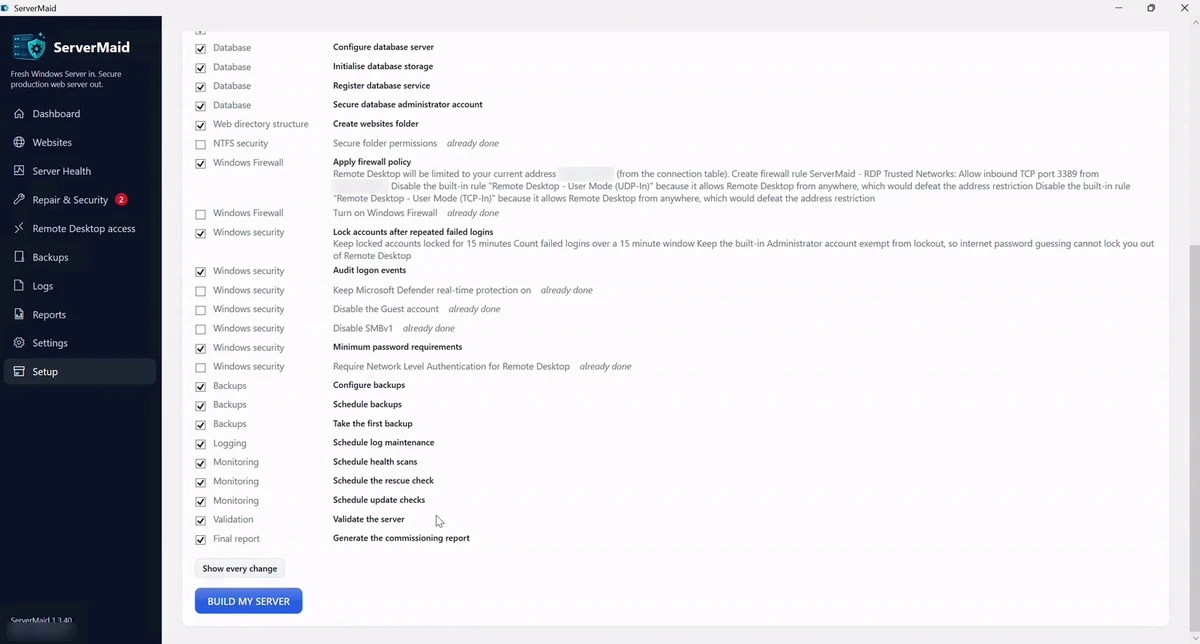
Server changes can have serious consequences, so each one is shown to you before it runs, checked afterwards and recorded so it can be undone. Changes to remote access carry a safety timer, so you cannot lock yourself out of your own server.
Drift detected, not discovered
Updates, manual tweaks and new software slowly pull a server away from how it was built. ServerMaid knows how it should look, notices what changed, tells you why it matters and offers the fix. How drift detection works.
No extra panel facing the internet
Many hosting panels add their own web login and management port for attackers to find. ServerMaid runs on the server itself, over the Remote Desktop session you already use, with no inbound port to open. ServerMaid compared with a control panel.
Why people switch
The old way, and the ServerMaid way
Setting up IIS, PHP and MySQL by hand is a weekend of half-right blog posts, or a day of a specialist's time, and then again for every change. ServerMaid is the checklist a specialist would follow, run for you in minutes, with proof at the end.
Doing it by hand
- Which IIS role services? Which PHP build? Which Visual C++ runtime?
- MySQL listening on every interface with a blank root password
- Folder permissions copied from a forum answer from 2014
- One wrong firewall rule and Remote Desktop is gone
- Backups that nobody has ever tried to restore
- SSL bought yearly, renewed by hand, or forgotten until the browser warns
- A specialist's day rate for the setup, and again for every change
With ServerMaid
- Official PHP and MySQL builds, verified against their published fingerprints
- Database bound to localhost, root secured, one account per website
- A versioned security baseline, every control explained before it is applied
- Remote Desktop open only to the places you connect from, added from one page, with an auto-revert timer so you are never locked out
- Scheduled backups proven by a real restore test
- Free SSL certificates*, trusted by every browser, renewed before they expire
- Done in minutes, the same way every time, and the upkeep is built in
What you get
Everything a production web server needs, done properly
The parts a specialist would set up, secure and keep running, done for you. Every change is checked first, applied only when needed, verified afterwards and recorded so it can be rolled back.
Free SSL certificates*, automatic
Every website gets a free certificate from Let's Encrypt, trusted by every browser, installed into IIS with an HTTPS redirect and renewed before it expires. No yearly certificate bill, no renewal reminders.
Websites in one form
Add a website and get its folders, application pool, database, pretty URLs and certificate from one screen. Then upload it as one zip with its .sql file: the database is imported and the connection settings fixed with your OK. Staging sites included.
IIS and PHP, wired correctly
The right IIS role services, official PHP builds, FastCGI with recycling, and a production php.ini sized for your server. Advanced Setup lets you choose the server's default PHP line before the build: PHP 8.4 (recommended), PHP 8.5 (latest) or PHP 8.3 (security fixes only), each explained, with the newest build of that line fetched from windows.php.net. Quick Setup keeps 8.4.
WordPress in one click, already hardened
Tick "Install WordPress" on the add-website form and ServerMaid fetches the latest release from wordpress.org, checks it against the official checksum, connects it to the site's own database and locks it down: file editor off, PHP refused in the uploads folder, xmlrpc.php blocked, admin pages over HTTPS, security releases installing themselves. You open the site and choose the admin user. The WordPress module, included in every Agency licence. How the WordPress install is hardened.
MySQL or MariaDB, local only
Installed from signed packages, bound to localhost, root secured, one database and one account per website with rights on that database only.
Security baseline you can read
Folder permissions, firewall rules, request filtering and Windows hardening from a versioned baseline, each control explained before it is applied.
Never locked out
Remote Desktop is limited to the addresses you choose, and you can add home, office or a phone hotspot from one page whenever you need. Changes that could affect your remote access run with an auto-revert timer: if you cannot get back in, ServerMaid undoes them by itself.
Backups that are proven
Websites, databases and configuration on a schedule, verified by fingerprint and by a real restore test, with retention you set.
A health score with reasons
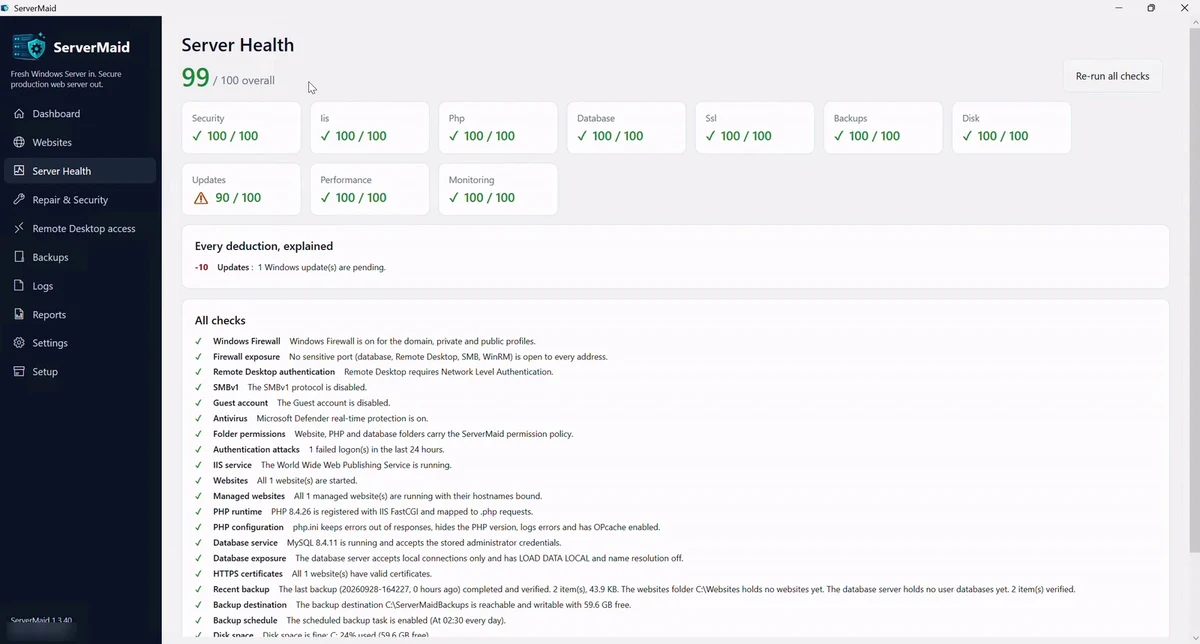
Real checks, not decoration. Every deduction says what is wrong and offers a fix that is previewed before it runs.
Drift detection and repair
ServerMaid records what the server should look like, spots the settings that have changed since, fixes safe issues in one click and rolls back any deployment step by step. Repair, not reinstall.
Plain English everywhere
"PHP cannot start because a Microsoft Visual C++ runtime is missing" with a button to fix it. Technical details stay one click away.
Migration without the baggage
Rebuilt, not cloned. ServerMaid Migrate takes each site's files, database and host names from the old Windows server and rebuilds it on a freshly hardened one. Old permissions, database accounts, web.config files and logs stay behind. How migration works.
Nothing new to attack
No extra web control panel and no management port. ServerMaid works on the server over your existing Remote Desktop session, and your websites and databases never leave it, so the management surface stays as small as it can be.
Go deeper: the whole Windows Server web hosting setup, free SSL on IIS, security hardening, backups proven by restore, configuration drift detection, why it is not another control panel and PHP and MySQL on Windows. Problems we solve: RDP brute-force attacks, being locked out by a firewall rule, WordPress on IIS, moving off shared hosting, upgrading PHP, a website that stopped working and running a server without a sysadmin. New to all this? Start with the walkthrough from domain name to live site, or browse all 14 guides.
- Web server responding on every binding
- PHP handler healthy, opcache on
- Database local-only, root secured
- Last backup verified 03:14 today
- Certificate for shop.example renews in 12 days Renew now
- 2 GB free on C:, below the 5 GB target Free space
Afterwards
A health score that tells you why
ServerMaid keeps checking after the build: bindings, PHP, the database, disk, backups, certificates, firewall, drift from the security baseline. Every deduction is a sentence you can act on, with a fix that is previewed before it runs.
Something changed behind its back? Repair compares the server with what it should look like and puts it right, step by step, with rollback for each one.
See pricingHow it works
Copy it to the desktop. Click once. Done.
ServerMaid is one file. Quick Setup asks where to keep your websites and which database to install, then one click does the rest. Advanced Setup exposes every choice with a recommended default.
Copy it to the desktop
Download ServerMaid and your licence file from your account, copy them to your server's desktop over Remote Desktop and run the installer. Open ServerMaid, choose the licence file, and it inspects the machine and tells you exactly what it found before touching anything.
Click once
Press BUILD MY SERVER. Every step runs in order with live progress: IIS, PHP, MySQL, the security baseline, firewall, backups and the free SSL certificate*. A snapshot is taken first, so anything can be rolled back. Curious first? PREVIEW CHANGES lists every step with its risk.
Walk away
You come back to a validated server: health score, commissioning report, scheduled backups and log retention. Add websites from the wizard whenever you like.
No server specialist needed
Server administration without becoming a server administrator
When something is wrong, a red warning is not enough. ServerMaid answers three questions every time: what is wrong, why it matters, and how to fix it. That is what you would pay a specialist for; ServerMaid does it on every server, every day, with the technical detail one click away.
One installer, one licence per server
Pay for the modules you use. Nothing else.
Start with Server setup; add Websites with free SSL*, Backups, Staging or extra PHP lines whenever you need them. A single-server licence covers twelve months of modules and updates; renew it yearly from your account. Each licence is activated on the server it runs on and stays locked to it; if a server is ever replaced, support frees the slot for the new one. Everything a module has built keeps running if a licence lapses; ServerMaid's own signed updates install only while the licence is in date.
Who it is for
Built for people who run websites, not just sysadmins
Web agencies
Stand up client servers in minutes, the same way every time, with a report you can hand over. One agency licence covers 3, 6 or 12 servers, or packs of twelve beyond that, and your account shows every server's state at a glance (Looks fine, Drifting, Needs attention) so you know which client server needs a Repair without logging into each. ServerMaid for agencies.
Developers, freelancers and small businesses
The independence of your own VPS without the usual complexity. Run PHP and MySQL on Windows, host your own app or move off shared hosting without learning IIS internals. ServerMaid does the setup and the upkeep.
IT teams and hosting providers
Repeatable Windows web server deployment on the platform you already run, hardened to a baseline you can review line by line. Ideal for businesses running IIS websites without a dedicated server administrator.
Questions people ask
What does ServerMaid need?
A 64-bit Windows Server 2019, 2022 or 2025 with an internet connection, run as an administrator. Windows 10 and 11 work for evaluation. Nothing else needs to be installed first; ServerMaid downloads and verifies IIS features, PHP and MySQL itself.
Is ServerMaid a hosting control panel?
No. A control panel gives you screens to manage a server and expects you to know what to do with them. ServerMaid does the server engineering itself: it builds the server to a known-good design, verifies it, watches it for drift and repairs it. It also runs on the server rather than adding another web panel for attackers to find. ServerMaid and control panels compared.
Is it safe to run on a server that already has IIS or PHP?
Yes. Pre-flight detects what is there. Anything ServerMaid did not install is reported and left alone, never silently replaced. If it cannot proceed safely it says so before changing anything.
What happens if I stop paying?
Your server and websites keep working exactly as they are. ServerMaid drops to read-only for the lapsed modules: it still inspects and reports, it just makes no new changes until a licence is installed. It never switches off anything your visitors depend on.
Do I need to know how to code, or how Windows Server works?
No. ServerMaid asks where your websites should live, shows you the plan in plain English and builds the server. Adding a website is one form. If something needs attention it tells you what and offers the fix; the technical detail is one click away for anyone who wants it.
Are the SSL certificates really free?
Yes, with the Websites and SSL module (included in Agency and Enterprise licences) on a licence within its twelve-month period. ServerMaid requests free SSL certificates* from Let's Encrypt, the free certificate authority trusted by every browser and used by a large share of the web. They are installed into IIS with an HTTPS redirect and renewed automatically before they expire while the licence is in date, so there is no yearly certificate bill and nothing to remember.
Can ServerMaid install WordPress for me?
Yes. On the add-website form tick "Install WordPress (latest) into this site". ServerMaid downloads the current release straight from wordpress.org, verifies it against wordpress.org's own checksum, unpacks it into the site, writes wp-config.php against the site's own database and database user, generates unique security salts on the server and sets pretty permalinks with the URL Rewrite rules WordPress needs on IIS. Then you open the site and choose the admin user. The install is hardened as standard: the theme and plugin file editor is off, PHP cannot run from the uploads folder, xmlrpc.php and wp-config.php are refused, admin pages are forced over HTTPS when the site has a certificate, and minor security releases install themselves. Plugins and themes stay your call: install only from wordpress.org and keep them updated. Needs the WordPress module (included in every Agency licence).
Can I connect to my server from more than one place?
Yes. ServerMaid locks Remote Desktop down to the addresses you allow, so the password-guessing bots that hammer every public server never reach the login screen. The Remote Desktop access page lists those addresses with a note for each (home, office, phone hotspot); add one, press apply, and it is in the firewall. ServerMaid refuses any list that leaves out the address you are connected from, and every change runs with a safety timer that undoes it if you do not confirm you can still get in.
Does ServerMaid need a cloud service or an inbound port?
No. Everything runs on your server; nothing about your websites or databases leaves it. Your licence is activated with servermaid.com when installed and confirmed when you build, and updates are checked against a signed feed. There is no inbound port to open.
How is SSL handled?
Automatic certificates from Let's Encrypt with HTTP validation, installed into IIS with HTTPS bindings and an HTTP to HTTPS redirect, renewed by a scheduled task. You can also use an existing certificate or import a .pfx.
Does ServerMaid patch PHP security flaws such as PHP2Shell?
Yes, from version 1.3.47. The hourly scan compares every PHP line ServerMaid installed with the official windows.php.net release list; when a security release such as the PHP2Shell fix (CVE-2026-109618 and CVE-2026-109619) appears, it is downloaded, verified, installed in place and the old PHP worker processes are stopped, with nobody logged on. Your php.ini and your PHP line stay as they are, the old copy is kept for rollback, and the Dashboard shows an alert until it is done. Read the PHP2Shell guide.
Something we have not answered? Write to support@servermaid.com and a person replies. Ready to go? See pricing and set up your server.
Build it. Secure it. Prove it. Watch it. Repair it.
Pick the modules you need, pay for twelve months, and your account with the licence and installer is ready in minutes. No specialist to book, no certificate to buy. Every build shows you the whole plan before it changes anything, and every step can be rolled back.
* Free SSL certificates need the Websites and SSL module (included in Agency and Enterprise licences) on a licence within its twelve-month period. Certificates come from Let's Encrypt; new websites get one while the licence is in date, and certificates already issued keep renewing.