
Windows Server security hardening
A hardened Windows web server, without a security specialist
A public web server is attacked within minutes of going online: password-guessing bots on Remote Desktop, scans for open database ports, probes for writable folders. ServerMaid applies a versioned security baseline to Windows, IIS, the database and the file system, explains every control before it is applied, and keeps checking that the server has not drifted from it.
Part of the Server setup module, £99 £49.50 per server for twelve months. Every control previewed, journaled and reversible.
The baseline
What gets locked down, and why
Each control reads its values from a named baseline manifest, so you can see exactly which version of the standard your server meets. Stricter settings you already have are left alone.
Remote Desktop, only from your places
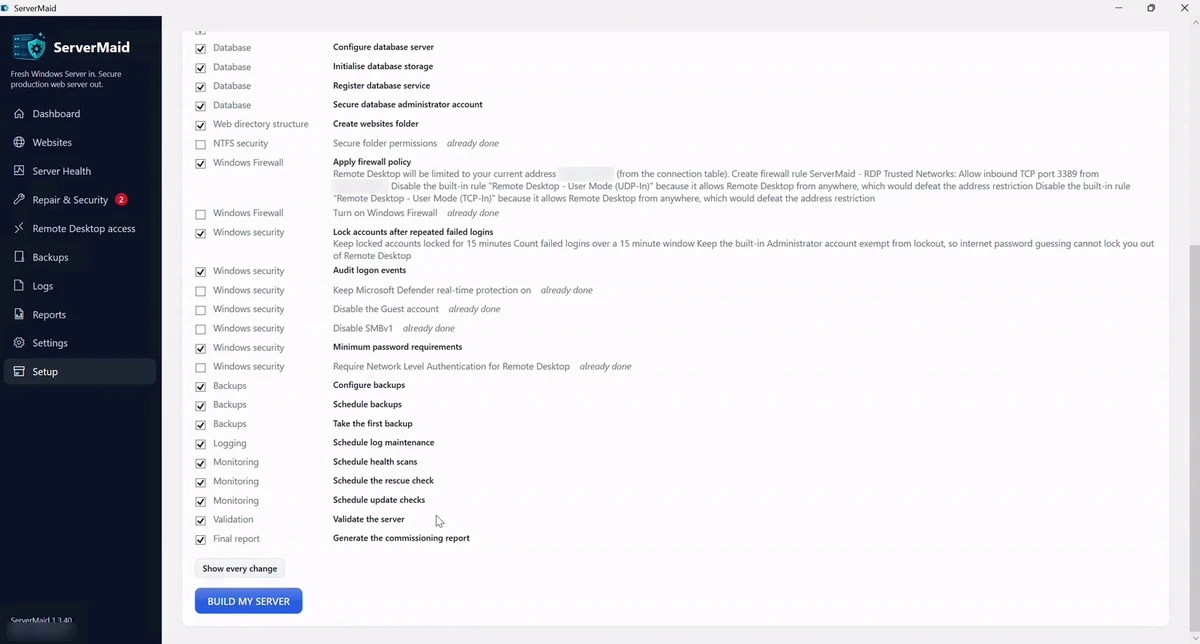
The firewall allows Remote Desktop only from the addresses you choose: home, office, a phone hotspot, each with a note. Network Level Authentication is required. The bots that hammer every public server never reach the login screen.
Never locked out
Any change that could affect your remote access runs with an auto-revert timer. ServerMaid refuses a list that leaves out the address you are connected from, and if you cannot confirm you are still in, it undoes the change by itself.
Firewall you can read
HTTP and HTTPS in, the database port blocked from the outside, everything else closed, the firewall on for every profile. Rules are named ServerMaid so you can tell them apart; rules created by others are never rewritten.
NTFS permissions per website
Nothing is ever granted to Everyone or Users. Each website's application pool gets read on its folder, modify only on wwwroot, temp and logs, nothing on backups. A permission engine computes the exact ACL and applies only what differs.
Database local only
MySQL or MariaDB listens on localhost, root has a generated 32-character password kept in an encrypted vault, anonymous accounts and the sample database are removed. Each site gets one account with rights on its own database only.
Windows controls
SMBv1 off, Guest account disabled, Defender real-time protection on (or your own antivirus recognised), account lockout thresholds, password policy and logon auditing set, all through the documented Windows mechanisms and each one reversible.
IIS request filtering
Request filtering and sensible limits on the web server, with URL Rewrite for the HTTPS redirect and clean URLs, so PHP applications get the front-controller rules they expect without a hand-written web.config.
Verified packages only
PHP and the database engine are installed only from official builds whose published fingerprints or Authenticode signatures check out. ServerMaid never installs a package it cannot verify.
Attack signals watched
The health score includes failed-logon bursts, drift from the baseline, broad write access and pending Windows updates, each with a reason and a fix.
* Free SSL certificates need the Websites and SSL module (included in Agency and Enterprise licences) on a licence within its twelve-month period. Certificates come from Let's Encrypt; new websites get one while the licence is in date, and certificates already issued keep renewing.
Afterwards
Hardened once is not hardened forever
Drift detection
Repair compares the live server with the baseline it should meet. Anything changed behind ServerMaid's back is listed with what it should be, and fixed in one click if it is safe to.
A score with reasons
Security carries the biggest weight in the health score. Every deduction is a sentence you can act on, not a red light.
Reports you can hand over
The commissioning report records the baseline version, every control and its state, so an agency can show a client exactly what was done.
WordPress hardening included
The baseline covers the server. When a website is added with the one-click WordPress install (the WordPress module, included in every Agency licence), the application gets the same treatment: the theme and plugin file editor is switched off, PHP is refused with a 403 anywhere under wp-content/uploads, direct requests to wp-config.php, xmlrpc.php, readme.html, license.txt and .git or .svn folders are refused, wp-config.php is read-only for the site's own application-pool identity, the security salts are generated on the server, admin pages are forced over HTTPS once the site has its certificate, and WordPress minor security releases install themselves. The database user can reach only that site's database. Plugins and themes stay the owner's job: wordpress.org only, kept updated, unused ones deleted. How the WordPress install is hardened, row by row.
Questions about hardening a Windows web server
Will it lock me out of my own server?
No. ServerMaid refuses any Remote Desktop rule that does not include the address you are connected from, and every change that touches remote access runs with a safety timer that reverts it unless you confirm you are still connected.
My home internet address changes. What then?
Add the new address from the Remote Desktop access page while you are still connected from an allowed one, or from another allowed location such as the office or a phone hotspot. If you are ever shut out, support can walk you through the hosting provider's console rescue.
Can I see the controls before they are applied?
Yes. PREVIEW CHANGES lists every control with its risk label and a plain-English explanation, and Advanced Setup lets you switch individual controls off.
What if I already run different security software?
A server with another antivirus registered is treated as compliant with a note. Existing firewall rules and stricter policies are left alone; ServerMaid only manages what it created.
Can everything be undone?
Yes. Every control records the previous value and can be rolled back individually or as part of the whole deployment.
Put a real baseline on your server today
One click applies it, one page keeps Remote Desktop open only to you, and the health score tells you the moment anything drifts.