
Web server setup software
Web server setup software for your Windows VPS
ServerMaid is web server setup software for Windows Server. Copy it to a fresh VPS, click once, and it builds a production-grade IIS, PHP and MySQL web host the way a specialist would, with free SSL certificates* that renew themselves and backups proven by restore. No coding, no PowerShell, no specialist. If you want VPS web server setup software that explains every step in plain English and can roll any of them back, this is it.
Single-server modules from £99 £49.50 per server for twelve months. Agency licences from £99 £49.50 a month billed yearly for 3, 6 or 12 servers. 30-day money-back promise.
Your automated Windows web server engineer
ServerMaid isn't just another hosting control panel. Traditional server-management tools give you controls and expect you to know what to do with them, and many expect a web server that is already set up before they will even install. ServerMaid takes a different approach. Give ServerMaid a Windows Server and it helps build, secure, verify, monitor, maintain and repair a production-ready IIS web server, without requiring you to become a Windows sysadmin.
ServerMaid automates much of the work normally performed manually by an experienced Windows server engineer, starting from a fresh Windows Server with nothing else installed.
What web server setup software should do for a VPS
A freshly rented VPS is a blank Windows Server. It has an administrator password, Remote Desktop open to the whole internet, and nothing else. Before it can host a website safely it needs a Windows Server web server setup that a specialist would sign off: IIS with the right role services, an official PHP build wired into FastCGI, a database that only listens locally with a real root password, folder permissions that give each site exactly what it needs, a firewall that lets the web in and keeps everything else out, a security baseline for Windows itself, HTTPS that renews, backups that have been restored at least once, and a way to check all of it is still true next month.
Done by hand, that checklist is where things go wrong. MySQL ends up listening on every interface. PHP is copied in without the runtime it needs and IIS answers with "FastCGI process exited unexpectedly". Folder permissions are either too loose or block uploads. A firewall rule typed at midnight locks you out of your own server. The certificate expires on a bank holiday. The backups were never tested, and the Remote Desktop logs fill with failed logons from the day the server went live.
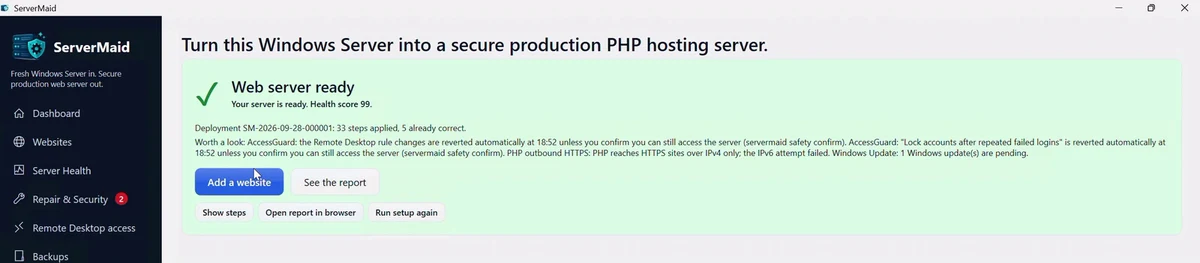
Good VPS web server setup software does the whole checklist in order, shows the plan first, records each change so it can be undone, and proves the result. That is why a ServerMaid build ends with a validation suite, a health score and a commissioning report rather than a "done" message.
IIS PHP MySQL setup software
What ServerMaid sets up
IIS, configured properly
The web server role with static content, default documents, logging, request filtering, CGI for PHP and URL Rewrite. A snapshot is taken first and every step is explained before it runs.
PHP 8.3, 8.4 or 8.5
Choose the server's default PHP line before the build: 8.4 (recommended), 8.5 (latest) or 8.3 (security fixes only). ServerMaid fetches the newest build of that line from windows.php.net, verified by its published SHA-256 fingerprint, with a production php.ini and FastCGI recycling. Run several PHP lines side by side and pick one per website.
MySQL 8.4 LTS or MariaDB
A signed package, bound to localhost, with a 32-character root password kept in an encrypted vault. Each website gets its own database and an account with rights on that database only.
Security baseline and firewall
Remote Desktop locked to the locations you connect from, with an auto-revert timer so a mistake never locks you out. SMBv1 off, Guest disabled, lockout and audit policies set.
Free SSL certificates*
Every website gets a certificate from Let's Encrypt, trusted by every browser, installed into IIS with an HTTPS redirect and renewed by a scheduled task before it expires.
Backups proven by restore
Websites, databases and configuration on a schedule, verified by fingerprint and by replaying each database dump. Ready for WordPress, Laravel or any PHP site.
WordPress in one click, already hardened
Web server setup software should also set up the application most people put on the server. Tick "Install WordPress (latest) into this site" on the add-website form and ServerMaid downloads the current release from wordpress.org, checks it against wordpress.org's checksum, writes wp-config.php against the site's own database user, generates the salts locally and sets pretty permalinks. The install is hardened before you see it: file editor off, PHP refused in the uploads folder, xmlrpc.php and wp-config.php refused, admin pages over HTTPS, minor security releases installing themselves. You open the site and choose the admin user. This is the WordPress module (included in every Agency licence). The full list of what is applied.
From rented VPS to live website
VPS web server setup software, step by step
Rent a Windows Server VPS
Any provider will do. Pick Windows Server 2019, 2022 or 2025 that meets the system requirements and install Windows updates. Moving off shared hosting? This guide covers the switch.
Copy ServerMaid to the desktop
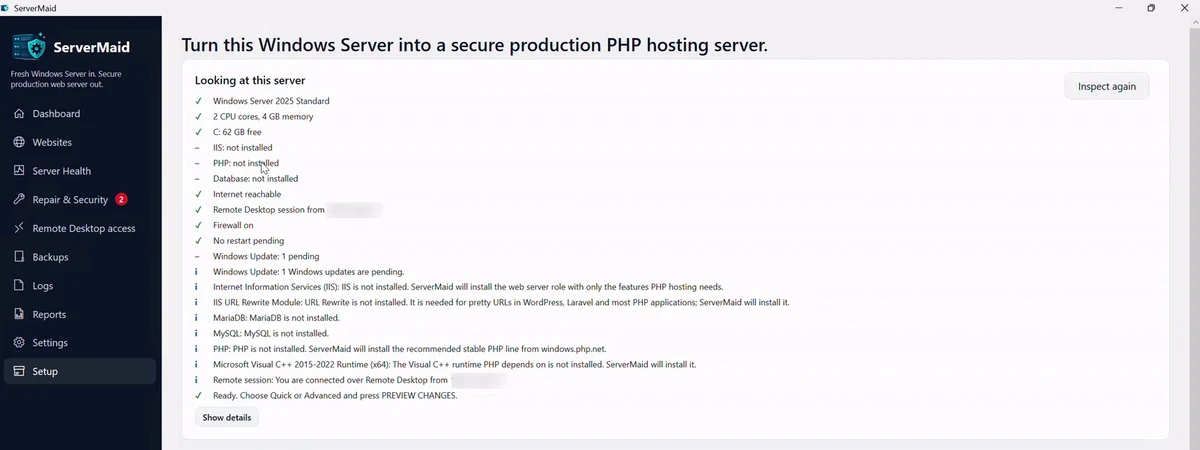
Download ServerMaid and your licence file from your account, copy them to the server's desktop over Remote Desktop and run the installer. ServerMaid inspects the machine and tells you what it found before changing anything.
Click BUILD MY SERVER
PREVIEW CHANGES lists every step with its risk label. Then the build runs with live progress: IIS, PHP, the database, firewall, baseline and backups, followed by a validation suite that fails if anything real is wrong.
Add websites from one form
Hostname, PHP line, pretty URLs, database and free SSL certificate*, all from one form, with a checkbox (the WordPress module, included in every Agency licence) that installs the latest WordPress, hardened, into the site. Registering a domain and pointing DNS at the server is covered step by step if you have never done it.
Who it is for
One server or a dozen, the same production-grade setup
Small business with one VPS
You have outgrown shared hosting and want your own server without hiring anyone. Click once and run your site without a server administrator; the health score says in plain English if anything needs attention.
Freelancer or developer
You build PHP sites and would rather ship them than fight IIS. Several PHP lines on one server, upgrades without breaking older sites, staging copies for client review, and a one-click Repair when a site goes down.
Web agency
Every client server built to the same baseline, drift alerts when something changes behind your back, and a commissioning report to hand over. Agency licences cover 3, 6 or 12 servers with every module included, and packs of twelve beyond that; your account shows every server's state (Looks fine, Drifting, Needs attention) so you know which client server needs a Repair.
Compare the options
By hand, a specialist, or web server setup software
| Doing it by hand | Hiring a specialist | ServerMaid | |
|---|---|---|---|
| Time | A weekend of half-right blog posts, longer if something breaks | A day, once they are available | Minutes, most of it downloading PHP and the database |
| Cost | Your time, and the outage when it goes wrong | A day rate, and another for every change | From |
| Repeatability | Every server slightly different | Depends who turns up | The same versioned baseline every time |
| Rollback | None; restore from a backup you hope exists | Whatever notes they kept | Snapshot first, every step journaled and reversible |
| SSL renewal | Calendar reminder, until one is missed | Another call-out | Automatic, tested on every deployment |
Questions about web server setup software
Does it work on any VPS provider?
Yes. ServerMaid needs a Windows Server VPS or dedicated server with an internet connection and an administrator account, and nothing else. It does not matter which provider rents you the machine or which data centre it sits in.
Which Windows Server versions are supported?
Windows Server 2019, 2022 and 2025, 64-bit. Choose the newest one your provider offers; the build is the same on each.
Do I need to know IIS?
No. ServerMaid installs the IIS role services a PHP website needs, wires PHP into FastCGI, creates each website with its own application pool and folders, and explains every step in plain English. Technical detail is one click away for anyone who wants it.
Is it a control panel like Plesk or cPanel?
No. A control panel is a second website running on your server that you pay for every month and must keep patched. ServerMaid is a desktop application that builds and hardens the server with standard IIS, PHP and MySQL, then keeps it healthy. There is no extra panel to patch or break into.
Can I use it on a home PC?
ServerMaid is built for Windows Server. Windows 10 and 11 can be used to evaluate it, but hosting a public website from a home PC on a residential connection is not something we recommend; a small Windows Server VPS is cheaper and safer.
What does it cost?
Single-server modules are priced per server for twelve months: Server setup £99, £49.50 Websites and SSL £79, £39.50 Backups £59, £29.50 Staging £39 £19.50 and Multiple PHP lines £39 £19.50. Renew yearly from your account at a reduced price. Agency licences cover 3, 6 or 12 servers with every module from £99 £49.50 a month billed yearly. See pricing.
Ready to turn that blank VPS into a web server?
Pick the modules you need, copy the installer and licence to the desktop and click once. The whole plan is shown before anything changes, and every step can be rolled back.
* Free SSL certificates need the Websites and SSL module (included in Agency and Enterprise licences) on a licence within its twelve-month period. Certificates come from Let's Encrypt; new websites get one while the licence is in date, and certificates already issued keep renewing.