
Guide: configuration drift
Your Windows web server is not the one you built. Here is how to find what changed.
Servers rarely stay as they were set up. Windows updates, a quick fix in IIS Manager, a new piece of software or a colleague's late-night change slowly pull a production server away from its intended state. That is configuration drift, and it is behind many of the "it was working yesterday" problems.
Server setup £99 £49.50 per server for twelve months, Repair and health checks included. 30-day money-back promise.
Where drift comes from on an IIS server
- Hand fixes under pressure. A PHP limit raised in php.ini, an application pool identity changed, a folder given Everyone: Full control "just to test".
- Installers. New software adds firewall rules, services and IIS modules, and rarely tells you.
- Updates and policy. Windows updates and group policy can reset security settings such as SMBv1, Network Level Authentication for Remote Desktop, or Defender options.
- More than one pair of hands. Every person with an administrator password is a source of undocumented change.
No single change looks dangerous. Together they leave a server nobody can describe with confidence, and one that is harder to secure, rebuild or migrate.
Checking for drift by hand
Without a tool, spotting drift means taking a snapshot of a known-good server and comparing against it later:
- IIS: keep a copy of
%windir%\System32\inetsrv\config\applicationHost.configand compare it with a file-diff tool. - PHP: keep each
php.iniand compare, including the FastCGI settings in IIS. - Firewall: export the rules with
netsh advfirewall exportand compare the inbound list, especially anything allowing Remote Desktop or database ports. - Permissions: save
icaclsoutput for the website folders and compare it. - Security settings: re-check SMBv1, Remote Desktop Network Level Authentication, the guest account, account lockout and audit policy.
It works, if you remember to take the snapshot first, repeat it on every server and know which differences matter. Most people only look after something has already broken.
The ServerMaid way
Build → Verify → Monitor → Detect → Repair
Recorded at build
Every build records the configuration it applied: IIS, PHP, the database, websites, permissions, firewall and the versioned security baseline. That record is what the server should look like.
Checked continuously
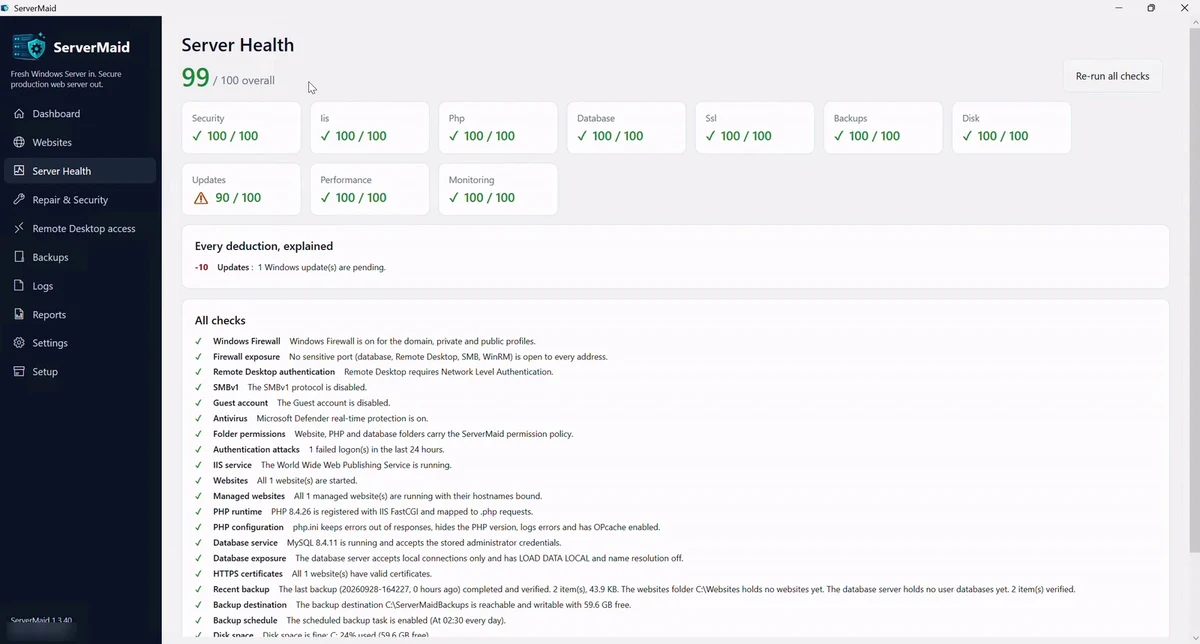
The health score re-checks the security baseline and the rest of the server, and the Repair scan compares every component with the record. Each difference is explained: what changed, why it matters, how to fix it.
Put right safely
Safe items are repaired in one click after a preview, recorded so they can be rolled back. Anything that conflicts with a change you made on purpose is flagged for your decision, never silently overwritten.
Running several servers? Your account shows each one's state at a glance (Looks fine, Drifting, Needs attention), and Agency licences add security drift alerts per server. ServerMaid for agencies.
Questions about configuration drift
What is configuration drift?
Configuration drift is the slow gap between how a server was set up and how it is set up now, caused by updates, manual fixes, new software and other people's changes. Each change may be harmless on its own; together they make a server unpredictable and harder to secure.
How does ServerMaid know what the server should look like?
Every build records the configuration it applied. The Repair scan compares each component of the live server with that record, and the health score re-checks the security baseline on a schedule.
Will it undo changes I made on purpose?
No change is made without you. The scan lists what differs; safe items can be repaired in one click after a preview, and anything that conflicts with your own changes is marked as needing your attention rather than overwritten.
Can I see drift across several servers?
Yes. Your ServerMaid account shows each server a licence is active on with its status, and Agency licences add security drift alerts per server, so you know which one needs a Repair without logging into each.
Build it. Secure it. Prove it. Watch it. Repair it.
ServerMaid, the automated Windows web server engineer. Single servers from £99 £49.50 for twelve months; Agency licences for 3, 6 or 12 servers.